![[flutter] 동영상 플레이어](https://img1.daumcdn.net/thumb/R750x0/?scode=mtistory2&fname=https%3A%2F%2Fblog.kakaocdn.net%2Fdna%2Fba37Xu%2FbtrVf8pzst2%2FAAAAAAAAAAAAAAAAAAAAAGmZf5uDZKTDUae9iD5Kp7rpFPh40_LG0ehgPs-HLAqV%2Fimg.png%3Fcredential%3DyqXZFxpELC7KVnFOS48ylbz2pIh7yKj8%26expires%3D1772290799%26allow_ip%3D%26allow_referer%3D%26signature%3DVGbjzsc8E3Inz2Gzv8c902qbhoE%253D)
1)
pub.dev에서 video_player와 image_picker 다운
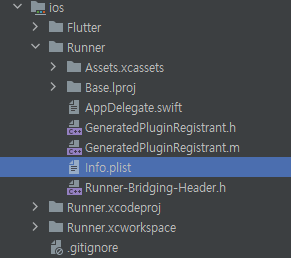
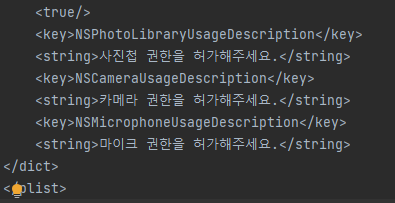
image_picker에서 ios 환경 설정
2)

3) main.dart
import 'package:flutter/material.dart';
import 'package:vid_player/screen/home_screen.dart';

void main() {
  runApp(
    MaterialApp(
      home: HomeScreen(),
    ),
  );
}
4) screen/home_screen.dart
import 'package:flutter/material.dart';
import 'package:image_picker/image_picker.dart';
import 'package:vid_player/component/custom_video_player.dart';

class HomeScreen extends StatefulWidget {
  const HomeScreen({Key? key}) : super(key: key);

  @override
  State<HomeScreen> createState() => _HomeScreenState();
}

class _HomeScreenState extends State<HomeScreen> {
  XFile? video;

  @override
  Widget build(BuildContext context) {
    return Scaffold(
      body: video == null ? renderEmpty() : renderVideo(),
    );
  }

  Widget renderVideo() {
    return CustomVideoPlayer(
      video: video!,
      onNewVideoPressed: onNewVideoPressed,
    );
  }

  Widget renderEmpty() {
    return Container(
      width: MediaQuery.of(context).size.width,
      decoration: getBoxDecoration(),
      child: Column(
        mainAxisAlignment: MainAxisAlignment.center,
        children: [
          _Logo(
            onTap: onNewVideoPressed,
          ),
          SizedBox(
            height: 30.0,
          ),
          _AppName(),
        ],
      ),
    );
  }

  void onNewVideoPressed() async {
    final video = await ImagePicker().pickVideo(
      source: ImageSource.gallery,
    );

    if (video != null) {
      setState(
        () {
          this.video = video;
        },
      );
    }
  }

  BoxDecoration getBoxDecoration() {
    return BoxDecoration(
      gradient: LinearGradient(
        begin: Alignment.topCenter,
        end: Alignment.bottomCenter,
        colors: [
          Color(0xFF2A3A7C),
          Color(0xFF000118),
        ],
      ),
    );
  }
}

class _Logo extends StatelessWidget {
  final GestureTapCallback onTap;

  const _Logo({
    Key? key,
    required this.onTap,
  }) : super(key: key);

  @override
  Widget build(BuildContext context) {
    return GestureDetector(
      onTap: onTap,
      child: Image.asset(
        'asset/image/logo.png',
      ),
    );
  }
}

class _AppName extends StatelessWidget {
  const _AppName({Key? key}) : super(key: key);

  @override
  Widget build(BuildContext context) {
    final textStyle = TextStyle(
      color: Colors.white,
      fontSize: 30.0,
      fontWeight: FontWeight.w300,
    );

    return Row(
      mainAxisAlignment: MainAxisAlignment.center,
      children: [
        Text(
          'VIDEO',
          style: textStyle,
        ),
        Text(
          'PLAYER',
          style: textStyle.copyWith(
            fontWeight: FontWeight.w700,
          ),
        ),
      ],
    );
  }
}
5) component/custom_video_player.dart
import 'dart:io';

import 'package:flutter/material.dart';
import 'package:image_picker/image_picker.dart';
import 'package:video_player/video_player.dart';

class CustomVideoPlayer extends StatefulWidget {
  final XFile video;
  final VoidCallback onNewVideoPressed;

  const CustomVideoPlayer({
    Key? key,
    required this.video,
    required this.onNewVideoPressed,
  }) : super(key: key);

  @override
  State<CustomVideoPlayer> createState() => _CustomVideoPlayerState();
}

class _CustomVideoPlayerState extends State<CustomVideoPlayer> {
  VideoPlayerController? videoController;
  Duration currentPosition = Duration();
  bool showControls = false;

  @override
  void initState() {
    super.initState();

    initializeController();
  }

  @override
  void didUpdateWidget(covariant CustomVideoPlayer oldWidget){
    super.didUpdateWidget(oldWidget);

    if(oldWidget.video.path != widget.video.path){
      initializeController();
    }
  }

  initializeController() async {
    currentPosition = Duration();

    videoController = VideoPlayerController.file(
      File(widget.video.path),
    );

    await videoController!.initialize();

    videoController!.addListener(() {
      final currentPosition = videoController!.value.position;

      setState(() {
        this.currentPosition = currentPosition;
      });
    });

    setState(() {});
  }

  @override
  Widget build(BuildContext context) {
    if (videoController == null) {
      return CircularProgressIndicator();
    }

    return Center(
      child: AspectRatio(
        aspectRatio: videoController!.value.aspectRatio,
        child: GestureDetector(
          onTap: () {
            setState(() {
              showControls = !showControls;
            });
          },
          child: Stack(
            children: [
              VideoPlayer(
                videoController!,
              ),
              if (showControls)
                _Controls(
                  onReversePressed: onReversePressed,
                  onPlayPressed: onPlayPressed,
                  onForwardPressed: onForwardPressed,
                  isPlaying: videoController!.value.isPlaying,
                ),
              if (showControls)
                _NewVideo(
                  onPressed: widget.onNewVideoPressed,
                ),
              Positioned(
                bottom: 0,
                right: 0,
                left: 0,
                child: Padding(
                  padding: const EdgeInsets.symmetric(horizontal: 8.0),
                  child: Row(
                    children: [
                      Text(
                        '${currentPosition.inMinutes}:${(currentPosition.inSeconds % 60).toString().padLeft(2, '0')}',
                        style: TextStyle(
                          color: Colors.white,
                        ),
                      ),
                      Expanded(
                        child: Slider(
                          value: currentPosition.inSeconds.toDouble(),
                          onChanged: (double val) {
                            videoController!
                                .seekTo(Duration(seconds: val.toInt()));
                          },
                          min: 0,
                          max: videoController!.value.duration.inSeconds
                              .toDouble(),
                        ),
                      ),
                      Text(
                        '${videoController!.value.duration.inMinutes}:${(videoController!.value.duration.inSeconds % 60).toString().padLeft(2, '0')}',
                        style: TextStyle(
                          color: Colors.white,
                        ),
                      ),
                    ],
                  ),
                ),
              ),
            ],
          ),
        ),
      ),
    );
  }

  void onReversePressed() {
    final currentPosition = videoController!.value.position;

    Duration position = Duration();

    if (currentPosition.inSeconds > 3) {
      position = currentPosition - Duration(seconds: 3);
    }

    videoController!.seekTo(position);
  }

  void onPlayPressed() {
    // 이미 실행중이면 중지
    // 실행중이 아니면 실행
    setState(() {
      if (videoController!.value.isPlaying) {
        videoController!.pause();
      } else {
        videoController!.play();
      }
    });
  }

  void onForwardPressed() {
    final maxPosition = videoController!.value.duration;
    final currentPosition = videoController!.value.position;

    Duration position = maxPosition;

    if ((maxPosition - Duration(seconds: 3)).inSeconds >
        currentPosition.inSeconds) {
      position = currentPosition + Duration(seconds: 3);
    }
    videoController!.seekTo(position);
  }
}

class _Controls extends StatelessWidget {
  final VoidCallback onReversePressed;
  final VoidCallback onPlayPressed;
  final VoidCallback onForwardPressed;
  final bool isPlaying;

  const _Controls({
    Key? key,
    required this.onReversePressed,
    required this.onPlayPressed,
    required this.onForwardPressed,
    required this.isPlaying,
  }) : super(key: key);

  @override
  Widget build(BuildContext context) {
    return Container(
      color: Colors.black.withOpacity(0.5),
      height: MediaQuery.of(context).size.height,
      child: Row(
        mainAxisAlignment: MainAxisAlignment.spaceEvenly,
        children: [
          renderIconButton(
            onPressed: onReversePressed,
            iconData: Icons.rotate_left,
          ),
          renderIconButton(
            onPressed: onPlayPressed,
            iconData: isPlaying ? Icons.pause : Icons.play_arrow,
          ),
          renderIconButton(
            onPressed: onForwardPressed,
            iconData: Icons.rotate_right,
          ),
        ],
      ),
    );
  }

  Widget renderIconButton(
      {required VoidCallback onPressed, required IconData iconData}) {
    return IconButton(
      onPressed: onPressed,
      iconSize: 30.0,
      color: Colors.white,
      icon: Icon(
        iconData,
      ),
    );
  }
}

class _NewVideo extends StatelessWidget {
  final VoidCallback onPressed;
  const _NewVideo({
    Key? key,
    required this.onPressed,
  }) : super(key: key);

  @override
  Widget build(BuildContext context) {
    return Positioned(
      right: 0,
      child: IconButton(
        color: Colors.white,
        iconSize: 30.0,
        onPressed: onPressed,
        icon: Icon(
          Icons.photo_camera_back,
        ),
      ),
    );
  }
}
6)


'개발이 좋아서 > Flutter가 좋아서' 카테고리의 다른 글
| [flutter] 오늘도 출근 - 근퇴관리 앱_만들기 (0) | 2023.01.09 |
|---|---|
| [flutter] 오늘도 출근 - 근퇴관리 앱_환경 세팅 (0) | 2023.01.05 |
| [flutter] navigation (0) | 2023.01.03 |
| [flutter] button_ElevaredButton, OutlinedButton, TextButton, ButtonStyle (0) | 2023.01.03 |
| [flutter] 랜덤숫자 생성기 (0) | 2023.01.03 |