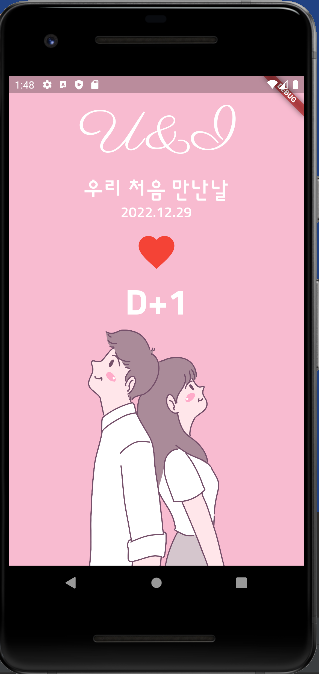
![[flutter] 만난지 며칠 U&I](https://img1.daumcdn.net/thumb/R750x0/?scode=mtistory2&fname=https%3A%2F%2Fblog.kakaocdn.net%2Fdna%2FbOqAMt%2FbtrUVjcr7Oz%2FAAAAAAAAAAAAAAAAAAAAACE9z-RcSeE2gkNAZft9_PV48DF6Pg285XclGHcijggC%2Fimg.png%3Fcredential%3DyqXZFxpELC7KVnFOS48ylbz2pIh7yKj8%26expires%3D1772290799%26allow_ip%3D%26allow_referer%3D%26signature%3D73Md3Yc%252B0s4wXTxSc5%252FsR5k9HP4%253D)
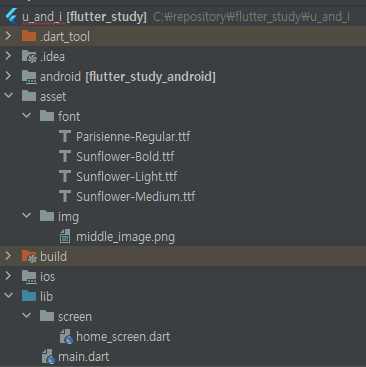
1)

2) home_screen.dart
import 'package:flutter/cupertino.dart';
import 'package:flutter/material.dart';

class HomeScreen extends StatefulWidget {
  const HomeScreen({Key? key}) : super(key: key);

  @override
  State<HomeScreen> createState() => _HomeScreenState();
}

class _HomeScreenState extends State<HomeScreen> {
  DateTime selectedDate = DateTime(
    DateTime.now().year,
    DateTime.now().month,
    DateTime.now().day,
  );

  @override
  Widget build(BuildContext context) {
    return Scaffold(
      backgroundColor: Colors.pink[100],
      body: SafeArea(
        bottom: false,
        child: Container(
          width: MediaQuery.of(context).size.width,
          child: Column(
            children: [
              _TopPart(
                selectedDate: selectedDate,
                onPressed: onHeartPressed,
              ),
              _BottomPart(),
            ],
          ),
        ),
      ),
    );
  }

  void onHeartPressed() {
    DateTime now = DateTime.now();

    showCupertinoDialog(
      context: context,
      barrierDismissible: true,
      builder: (BuildContext context) {
        return Align(
          alignment: Alignment.bottomCenter,
          child: Container(
            color: Colors.white,
            height: 300.0,
            child: CupertinoDatePicker(
              mode: CupertinoDatePickerMode.date,
              initialDateTime: selectedDate,
              maximumDate: DateTime(
                now.year,
                now.month,
                now.day,
              ),
              onDateTimeChanged: (DateTime date) {
                setState(() {
                  selectedDate = date;
                });
              },
            ),
          ),
        );
      },
    );
  }
}

class _TopPart extends StatelessWidget {
  final DateTime selectedDate;
  final VoidCallback onPressed;

  _TopPart({Key? key, required this.selectedDate, required this.onPressed})
      : super(key: key);

  @override
  Widget build(BuildContext context) {
    final theme = Theme.of(context);
    final textTheme = theme.textTheme;

    final now = DateTime.now();

    return Expanded(
      child: Column(
        mainAxisAlignment: MainAxisAlignment.spaceEvenly,
        children: [
          Text(
            'U&I',
            style: textTheme.headline1,
          ),
          Column(
            children: [
              Text(
                '우리 처음 만난날',
                style: textTheme.bodyText1,
              ),
              Text(
                '${selectedDate.year}.${selectedDate.month}.${selectedDate.day}',
                style: textTheme.bodyText2,
              ),
            ],
          ),
          IconButton(
            iconSize: 60.0,
            onPressed: onPressed,
            icon: Icon(
              Icons.favorite,
              color: Colors.red,
            ),
          ),
          Text(
            'D+${DateTime(
                  now.year,
                  now.month,
                  now.day,
                ).difference(selectedDate).inDays + 1}',
            style: textTheme.headline2,
          ),
        ],
      ),
    );
  }
}

class _BottomPart extends StatelessWidget {
  const _BottomPart({Key? key}) : super(key: key);

  @override
  Widget build(BuildContext context) {
    return Expanded(
      child: Image.asset(
        'asset/img/middle_image.png',
      ),
    );
  }
}
3) main.dart
import 'package:flutter/material.dart';
import 'package:flutter_study/screen/home_screen.dart';

void main() {
  runApp(MaterialApp(
    theme: ThemeData(
        fontFamily: 'sunflower',
        textTheme: TextTheme(
          headline1: TextStyle(
            color: Colors.white,
            fontFamily: 'parisienne',
            fontSize: 80.0,
          ),
          headline2: TextStyle(
            color: Colors.white,
            fontSize: 50.0,
            fontWeight: FontWeight.w700,
          ),
          bodyText1: TextStyle(
            color: Colors.white,
            fontSize: 30.0,
          ),
          bodyText2: TextStyle(
            color: Colors.white,
            fontSize: 20.0,
          ),
        )),
    home: HomeScreen(),
  ));
}
4)
'개발이 좋아서 > Flutter가 좋아서' 카테고리의 다른 글
| [flutter] 랜덤숫자 생성기 (0) | 2023.01.03 |
|---|---|
| [flutter] const_constructor (2) | 2022.12.29 |
| [flutter] DateTime (0) | 2022.12.28 |
| [flutter] 전자액자 만들기 (1) | 2022.12.27 |
| [flutter] webview (2) | 2022.12.27 |